(2020-12-16) XPAND Code Reader can now be launched without installing an app! See the article below for details.
2020.12.16You can now launch XPAND Code Reader via an App Clip Code.
iOS 14.3 or later only, but try scanning it with the standard camera.
XPAND/QR/JAN Code Reader launches without needing to install the app.
Pinch-to-zoom is also now supported...
Scanning XPAND Code with a QR Code Reader App
Some QR code reader apps can be configured to add basic support for XPAND Code.
Whilst it may not be sufficient in terms of scanning capability or ease of use, it is handy to be able to use an app you already have.
Here we introduce how to configure the leading QR code reader app "ICONIT" to scan XPAND Code.
*This article is based on our own independent research. Please refrain from contacting the ICONIT distributor with enquiries.
Settings in "ICONIT"
- Tap "Home" — "App Settings"
- Tap "Product Search" under "Advanced Settings"
- Configure as follows
| Search Site Name |
XPAND Code |
| Search URL |
https://xpand.codes/c/%s&app=ico |
Scanning XPAND Code with "ICONIT"
- Tap "Scan"
- Scan an XPAND Code
- On the scan results screen, tap "Look Up Barcode Product" — "Product Search"
- Tap "XPAND Code" from the list
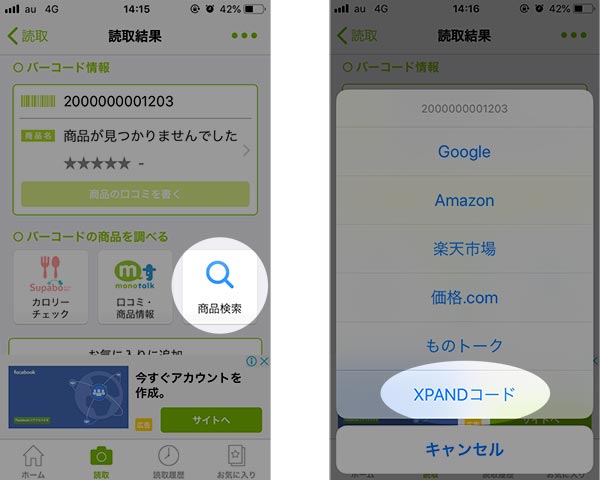
- The website will be displayed
Please note
As this is only basic support, it may not be possible to scan correctly in situations requiring high scanning performance, such as at long distances.
In such cases, please use XPAND.CODES Reader or a similar app.
2016.06.27
Scan the XPAND Code on a sign to access a wide range of additional information about that sign. XPAND Code can be created and scanned in the following ways.
Scan without installing an app
iOS App Clip version / Android Instant ...